Thursday, February 17, 2011

What is OTA? How to use OTA API? What all are possible with OTA API?

Quality Centre is a HP product, well before was HP it was owned by Mercury. Well this product is basically used by QA Organization with in a company as a Test Management Tool. Most of the organizations use this. However there could be a scenario where a particular project requires to use some other tool to log defects/ bugs. For ex: a project running in an Agile development environment that may use BugZilla for example, so development using 1 tool and QA using its organization specific QualityCentre may not be possible or in other words its hell a lot of work to enter bugs in to both the tools & keep them in sync as the project goes along.

To handle those scenarios QualityCentre comes with an API that a project can use to sync up other tools with QualityCentre. This API is called Open Test Architecture (OTA). You may notice QuickTest Professional and Quality Centre also uses this API to speak to each other. Another example is, people exporting bulk tests/  defects/ requirements in to QualityCentre from excel. This process also uses OTA in the background. However for this API the entry point is TDconnect.exe. You can download this exe file from internet by google'ing for it. Once you install this you will have the flexibility to use this in Excel or use the references/ API's in any other programming languages.

This way user can directly play with the database that the Quality Centre is running on without opening the GUI for it. You can literally perform every function that you can perform by logging on to its console, like
  • Logging in to QC
  • Find specific details about a Defect/ Requirement/ Test/ TestSet
  • Filtering Tests/ defects/ Requirements etc
  • Perform CRUD operations on Requirements/Tests/ TestSets/ Runs/ Defects etc
  • Also create links between Requirements > Tests, Tests > TestSets, TestSets > Defects and so on
You name it, you got it. Everything that you can manually on Quality Centre can also be done programatically using this API.

In order to perform most of the above mentioned stuff you would need to know the database structure/ schema so you know which table, which column to hit to get a value associated with a particular field in QC. Database schema is all open for everyone to know and is available on-line as well.

If you have Quality Centre installed on your machine, you can find the OTA reference guide, OTA database guide, and OTA custom type help files in your help folder. Alternatively, you can hit Help and then go to documentation page where you should get all this documentation ready available for you to either reference or download. In these help files you should see a good set of examples for each and every class module that we can use. an Example code to connect to QC is found as below:


Reference: OTA COM 9.0 Type Library

Note: You can find a list of open source tools that're currently available by searching for them on the internet. I found this link on the net http://www.software-pointers.com/en-defecttracking-opensource-tools.html

Sunday, February 6, 2011

Quality Centre: All about it

Quality Centre is a test management tool that provides a web interface to manage the test cases from
Writing the Requirements (Requirements Module is used to tracker requirements),
Planning tests for those requirements (Test Plan module is used to track the tests associated with a requirement),
Executing the tests (Test Lab module is used to track the execution of tests and associated defects),
Defects (Defects module is used to track the execution of defects raised while executing the tests in Test Lab)


Note: as a tester you're not expected to know the technical information of where the quality centre application is deployed & which server it is running on rather your QC Admin will provide you with a log-in credentials as soon as you join the company and you will soon find all the details about in no time.


Quality Center Login Procedure:


Quality centre is a quality management tool that is widely used to manage the test planning, execution and Defects. User can write a requirement, create tests for that particular requirement, run the tests and create defects thus completing a test cycle using Quality Centre.

Typically quality centre can be accessed using a link provided by your QC administrator. It could be something like http://localhost:8080/qcbin/start_a.jsp or http://localhost:8080/qcbin/start_a.html depending on the deployment server etc

Here localhost is server address, 8080 is the port number where the application server is running. It could be something like http://qc.companyname.com/qabin/start_a.html where companyname is the company you're working for.

Steps to follow to start working on QC are:
1. Obtain the link to access QC from your team lead or if you have access to QC administrator
2. Obtain authentication details from the above mentioned people
3. Obtain the Domain name & Project name that you should use to see ONLY your project. You can find this information from your project lead
4. Access the link obtained for QC by entering in to a IE browser & hit Enter. Remember, QC can not be accessed in Firefox or Chrome or any other latest browsers. Make sure the browser you're using is in the list of compatible browsers
5. Now enter userID, Password and click Authenticate button. This would enable Domain, Project combo-box where user can select the correct project name, domain name to which he has access to. Click Login button to complete Login

User Interface & Architecture: Depending on your installation, you may see the modules like Cycles/ Releases, Requirements, Business Components, Test Plan, Test Lab, Defects.

Business components module is used only when required in addition to other modules. This is completely installation based. This is widely/ specifically used in SAP based application testing, however this is not limited to only SAP application testing.


Write Requirements:

How and where do we write requirements in Quality Centre
Requirements module will consist of a space available for user to create a requirement or user story so user can plan writing tests in Test Plan module specific to an already existing requirement. A Typical requirements module will look like below (screen shot taken from Hp's website for reference)
Writing a requirement would require the following details. Number of mandatory fields would be installation based. 
  1. Name: Name of the requirement. This could be unique description or a brief description of what is this requirement for?
  2. Author: Who actually created this requirement? This is field will get populated automatically with the user ID with which the user is logged in to Quality Centre
  3. Creation Date: The Date on which this requirement was initially created
  4. Creation Time: Time on which this requirement was initially created
  5. Modified: Last modified date/time value. Automatically gets populated as soon one of any fields of the requirements is updated. This log is maintained and is available to view under History TAB
  6. Priority: Priority of the requirement. It could be something like 1 - Urgent, 2 - Major, 3 - High, 4 - Medium, 5 - Normal etc. This could vary from 1 installation to the other
  7. Req Id: An automatically populated field. This is a unique ID for every requirement created in the database
  8. Description: a details description of the requirement giving full details from A to Z
  9. Req Type: Type of the requirement is something to suggest whether this requirement was initiated/ taken from? Example, business requirements document or a user story taken from acceptance criteria set in the product's system requirement specification and so on
  10. Product: which product this requirement belongs to? there could be a number of projects/ products running in a company. To differentiate the requirements from 1 specific product area to the other
  11. Reviewed: who reviewed this requirement as to certify this is right
  12. Targert Release: release name under which this requirement is set to be released? Ex: In a waterfall model it could be something like "April 2012" or if its in an agile environment it could be something like "Sprint 25"
  13. Targert Cycle: In which cycle you would expect this to run thru? Ex: Regression Cycle, or Cycle4 or Sprint12 etc

You can find more about requirements module available in HP's Quality Centre module at the following link  https://h10078.www1.hp.com/cda/hpms/display/main/hpms_content.jsp?zn=bto&cp=1-11-127-24^37802_4000_100__

Saturday, November 27, 2010

Testing Tools: Different tools used for Testing

Depending on the size of the company, testing is done using various tools for each phase of testing.

Quality Management Tools:
Quality Center (9.2+) - Latest version available is 11. You can actually download a copy of it from HP's BTO software website. Most of the medium to big organizations do use HP's Quality Centre for writing and running tests
Note: For version 11 onwards this is more referenced as Application Life Cycle Management software - ALM
Microsoft Excel - for writing test cases
Microsoft Word - for writing test plans and test strategy document

Test Tools:
SOAP UI: for making web service requests and to verify the responses coming back
QTP: for automating the regression tests & create a regression suite that can be run continuously
Test Complete: for automating the regression suites
Load Runner: for load testing purposes
Win Runner: for automating the regression suites. Most of the places is now replaced by QTP
Fitnesse: to test individual methods or classes. Generally used to Unit test, or may be used for integration testing purposes. Mostly used by development in Agile development projects
Selenium: to perform integration or system test on web application using specific technologies. Can not run on all platforms/ applications. Mostly used in agile development projects

and so on..there's no end to this because of wide variety of projects and environment today's projects running on

Monday, October 25, 2010

Automation Tools - Different tools used for Automation

Automation is something that is becoming an important skill for any tester. If you have a minimum knowledge on how to automate an application & how to use the available automation tools would give a distinct quality for your profile.

Here in this blog, will try to explain what tools are in use in the present market and little bit about each of those tools.

GUI Layer Testing Tools:

Quick Test Professional (QTP) - by Hewlett-Packard (formerly owned by Mercury)
Test Complete (TC) - by Smart Bear (formerly Automated QA)
WinRunner - by Hewlett-Packard (formerly owned by Mercury)
IBM Rational Functional Tester - by IBM
Silk Test - by Borland

Note: This list contains only important or tools that are used by most of the companies. It doesn't include every tool that is in use.

Load/ Performance Testing Tools:

Load Runner - by Hewlett-Packard (formerly owned by Mercury)
IBM Rational performance Tester - by IBM
VisualStudio Load Test - Microsoft
Silk performer - by MicroFocus
GH Tester - by Greenhat

There's load of other load testing tools that you can find on internet.
References:

Sunday, October 24, 2010

Test Cases: Plan/ Write/ Execute

Test case is the test documentation that a tester would write documenting the below:
  • what functionality he's going to test, 
  • what input he would require to give to execute this test, 
  • in how many steps can he finish the step
  • what is expected out of each step and finally document what is the Actual result of each step while executing.

Writing test cases is one of the typical responsibility that any tester would do all the time at his work. However writing test cases is done in chunks in different stages of SDLC. Test cases are planned, written and executed in different stages of application development. Test cases should be

Planned: when requirement documents are being prepared
Written: when requirement documents are signed off and when development is busy coding, should be peer reviewed, walk through'ed with all stake holders
Executed: when development is done with coding and when code is handed off to QA

What is a Test case Matrix:

Test cases could be written in either a spresdsheet or in Quality Centre like quality management tools. In most of the small companies, would go prepare a Test Case Matrix if they want save some money on these quality management tools.

Test case Matrix is nothing but a spreadsheet that has a list of tests and its results formatted in a column format for readability purposes. In some cases Test case matrix may have a set of requirements, set of test cases for each of those requirements and its results after the run, any defects if raised and a link to the test case running which caused that defect. A perfect relationship that one would see in Quality Centre like management tools can be replicated in Excel spreadsheet.

Example Template can be found here......

Testing Deliverables

When you perform testing, you deliver a quality product that is clean code (defect free code). However on top of this as QA team you would also deliver documents suggesting how did you go about testing, what all test cases you ran, are you happy with the application or not? & finally any lessons learned from this testing. Typically the documents expected to be delivered from QA are given below:

2. Automation Test Scripts
3. Test Strategy/ Master Test Plan Document
4. Lessons Learnt Document
5. Sign-off Document

Note: These documents are stored in a file repository database so they can be referred to, if needed. Ex: Sometimes there's a bug found in production, so QA lead has a repository to go back to check for test cases that they wrote for testing that piece of functionality currently broke in production. If there were no tests written to test this particular scenario that failed in production, we will add a test to the regression test suite with High priority as this may repeat again

On top of this, you would be reporting the status of testing (may be in a weekly progress report call) using a document that you produce on the fly:

1. Defect Report

Note: Defect reports are generally used to track either test team or dev progress on the raised defects.

Saturday, October 23, 2010

Testing Process - Steps Involved in Testing an Application

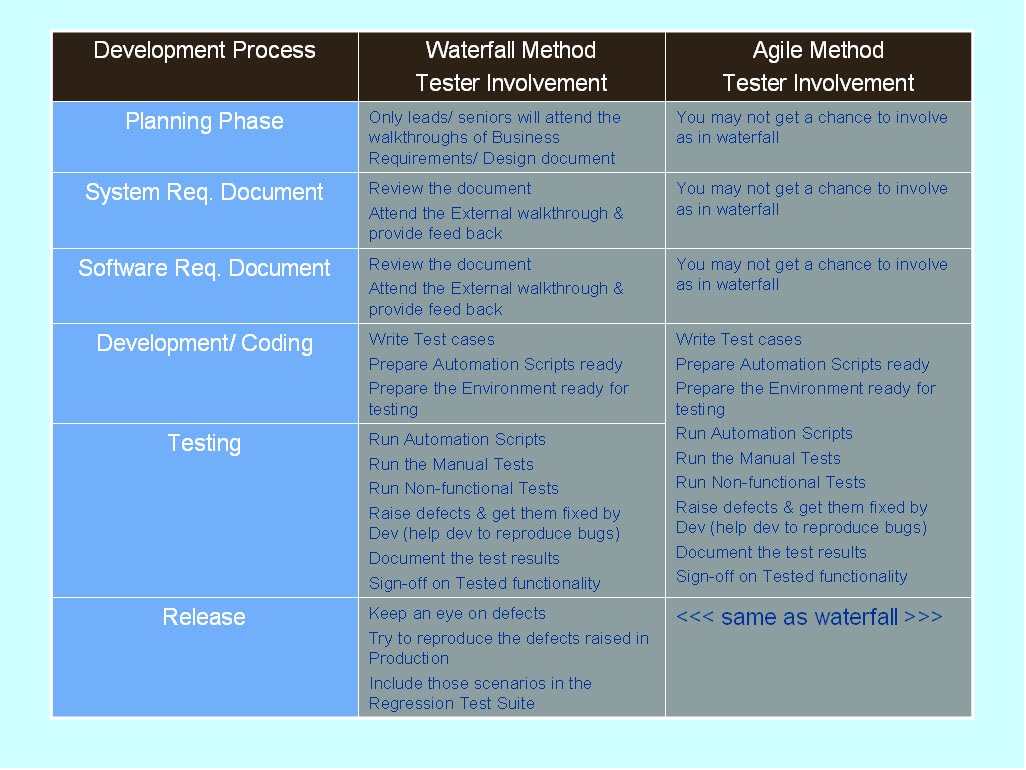
Whether it is waterfall or agile, typically testing starts right after development. If it is waterfall, testing will start after development is complete with coding. Where as in Agile, testing will start with only some x% of development is done. So obviously there's a lot of going back & forth in agile then waterfall. In both cases, to test an application a process needs to be followed. I tried to depict the process that a tester has to follow at different stages of development, in the following diagram.